


Melozi: AI Song, Music Maker
4.721.00 Reviews
App Specs
- Version
- 1.0.2
- Updated On
- License
- Free
- Downloads
- 100,000+
- Developer
- Mee Game Inc
- Categories
- Music & Audio
- Platform
- Android
Screenshots
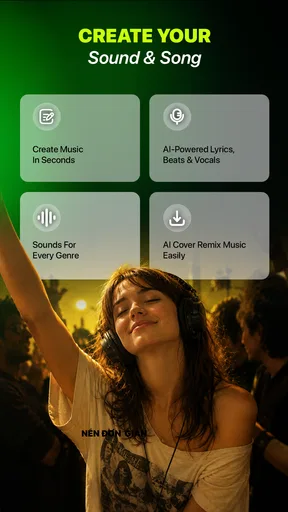
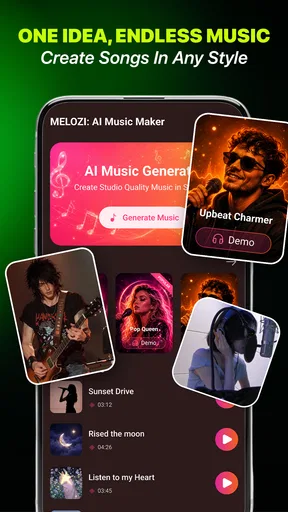
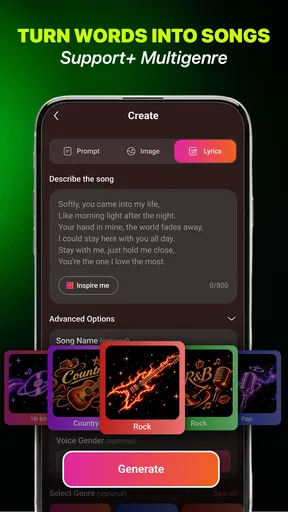
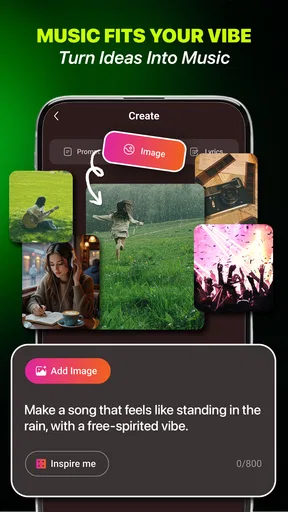
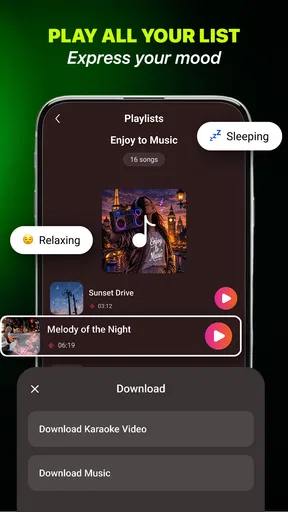
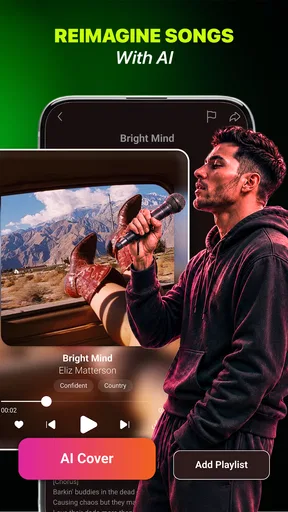
 Analysis by AppCompare
I’m most interested in music tools when they make it easy to turn a passing idea into something I can actually listen to. Melozi: AI Song, Music Maker is built around that kind of quick creation: it can work from text or an image, giving a casual experimenter a way to explore a musical mood without starting in a traditional recording program. My main advice is to treat it as an idea-making companion, not a guaranteed replacement for composing, editing, or producing a finished track.
First, decide what you want the music to do
Before opening a generator, I find it useful to name the job the music needs to perform. Is it meant to sit quietly behind a clip, set a mood while I brainstorm, or simply give me a surprising starting point? That decision makes a bigger difference than piling on adjectives. A prompt with a clear purpose gives me a better basis for judging the result, even if the app interprets some details differently than I imagined.
I’d also separate “I want to hear an idea” from “I need a finished track.” Melozi is appealing for the first task because it reduces the effort between imagination and listening. For the second, I would plan on reviewing the output and potentially using another tool. That distinction helps prevent disappointment: generated music can be a useful sketch without being the final piece I publish or play for an audience.
Where a connection becomes part of the creative process
Melozi is a free music-and-audio app from Mee Game Inc, and its central appeal is the short path from a prompt to a musical result. You can begin with words or an image, which makes it different from the usual music player and from many recording apps that expect you to bring instruments, loops, or audio files of your own. That flexibility is useful when you know the feeling you want but not how to arrange it.
Because the app generates music from input, the moments that matter most are the ones where it needs to interpret your prompt and return a result. I would plan to use it when a reliable internet connection is available rather than assuming every part of creation will work without one. The confirmed product details don’t establish offline generation, so I wouldn’t count on being able to create a song in airplane mode or in a dead-signal basement.
That connection dependence changes how I’d use the app in practice. If inspiration strikes during a commute, I’d jot down a concise text idea first and generate the music later, somewhere with a stable connection. If I’m already online, I can use the prompt as a starting point, listen critically, then decide whether the result captures the mood or needs a clearer direction. This small distinction prevents a weak connection from turning a spontaneous idea into a frustrating wait.
Prompts work best when they make a decision
A broad prompt such as “make something cheerful” leaves a lot for an AI system to interpret. I’d get more useful experiments by naming a scene, energy, and purpose in ordinary language: for example, music for a relaxed café scene, a playful short clip, or a quiet moment before bed. This isn’t a promise that the app will follow every nuance; it’s a practical way to give its text-based generation a more meaningful target.
Worth Reading Before You Choose

Flipboard Shows What News Apps Must Do Beyond the Feed

Switching to Android Auto Means Rethinking Your Driving Routine

Google Calendar Makes a Crowded Week Easier to Manage

Ludo King Makes the Most of the Minutes Between Plans

Baby Panda World Brings Quick Play to Modern Phones, but Its Game Library Feels Busy

ESPN’s Live Game View Makes Following Close Games Easier
The image option also invites a different workflow. Rather than expecting a picture to dictate a precise composition, I’d use it as a mood board: a rainy street, a bright kitchen, or a landscape can suggest a setting when I can’t find the right words. A helpful trade-off is to try text first when the desired result needs a specific use or emotional direction, and use an image when atmosphere is the main thing I’m trying to explore.
Good fit for small mobile moments
On a phone, Melozi makes most sense for short creative sessions. I can imagine opening it while taking a break, trying a few different descriptions for the same scene, and saving the most promising idea for later use if the app’s available workflow supports that. It also suits someone who wants to play with the relationship between an image and sound without learning a full digital audio workstation first.
One realistic everyday use would be planning a small birthday video. I might use a photo of the decorations as a visual cue, then try a text prompt that describes the intended mood—warm, celebratory, and not overly dramatic. The result could help me decide what kind of backing music fits before I spend time editing the video. I’d still listen through the whole track and check whether it feels suitable rather than assuming the generated output will match the image perfectly.
Another sensible use is overcoming the blank-page problem. If I’m writing lyrics, making a presentation, or sketching a social post and want a musical atmosphere to think against, a generated idea can give me something to react to. That is a narrower and more realistic role than asking the app to deliver a polished, release-ready song on the first try.
The app is rated for Everyone, and its current version is 1.0.2. It has a 4.6 average from around 1.7 thousand ratings, with over 100 thousand installs. Those figures suggest that people are giving it a try, but they don’t tell me whether a particular generated result will suit my taste; for an AI music app, that depends heavily on the prompt and on what I expect the output to do.
What to do when a generation stalls
Network-dependent creative tools can feel unpredictable when a request takes longer than expected. If a generation appears stuck, I would avoid repeatedly tapping the same action or rewriting the prompt several times in quick succession. First, I’d check whether the connection is steady, wait a moment, and then try again only if the app appears ready. That approach helps distinguish a temporary connection problem from a prompt that simply needs revision.
If the result is not right, I’d change one element at a time. For instance, keep the same scene but make the energy calmer, or keep the same mood while clarifying that the music is intended as background rather than a dramatic centerpiece. Changing everything at once makes it harder to learn what the system responds to. It’s a useful habit with generative tools generally, but especially so when each request takes time and depends on connectivity.
I would also keep a copy of any prompt that produces a result I like, using whatever note-taking method is convenient. That gives me a way to reproduce the creative direction later without relying on memory. It does not guarantee an identical output, but it preserves the part I control: the words and image choice that led to a promising result.
Use it thoughtfully on mobile data
When I’m away from Wi-Fi, I’d be selective about when to generate. A short text prompt is a practical first experiment, while repeated exploratory attempts may be better saved for a dependable connection. I can’t assume how much data any individual session uses, so anyone with a tight mobile plan should check their device’s data usage rather than relying on a guess.
The same caution applies to time and attention. A quick idea test can be enjoyable while waiting for a friend, but it’s less convenient if I need an immediate, precise soundtrack under pressure. For a deadline, I’d prepare a backup source of music rather than making the project depend entirely on a fresh AI generation. Melozi is more appealing when experimentation is part of the fun, not when every second matters.
It is free to install, with in-app purchases listed at $2.99 to $20.99 per item. I’d start with the free experience and see whether the output and workflow meet my needs before paying for anything. The value of a purchase depends on how often I create and what the paid item provides; I wouldn’t spend simply because I hoped it would solve a prompt or connectivity issue.
How it compares with familiar music tools
Compared with a conventional audio editor, Melozi lowers the barrier to making an initial musical sketch: I can describe or show an idea instead of building a track piece by piece. The trade-off is control. Someone who wants to place every note, adjust a detailed arrangement, or carefully mix recorded instruments will likely be happier in a dedicated production app.
Compared with a streaming service, Melozi serves a different purpose altogether. A streaming app is for finding and listening to existing music; this one is for generating something from a personal prompt. If I simply want a dependable playlist, I’d choose the familiar catalog. If I want to explore what a picture or a few descriptive words might sound like, Melozi is the more interesting experiment.
It may also be a useful companion to an editor rather than a substitute for one. I could use it to explore a direction, then move into a separate tool for arranging a video or finishing a larger project. Before relying on any generated track in public or commercial work, I’d check the app’s current terms and the intended platform’s rules; I would not assume that every generated result is automatically cleared for every use.
Who should try it—and who may prefer something else
I’d recommend Melozi to curious listeners, casual creators, and people who enjoy testing ideas without needing to know music theory. The image input is particularly appealing when a scene is easier to show than explain, while text is better when I want to specify a purpose or mood. Mee Game Inc’s app has a straightforward premise, and its free entry point makes it easy to find out whether this style of music generation clicks for me.
I’d steer away from it if I needed exact control, dependable offline creation, or a finished professional arrangement with no further editing. It is also not the right first choice for someone who only wants to play established songs. In those cases, a standard music library or a full audio workstation is more direct and predictable.
My connectivity verdict is simple: Melozi is best approached as an online creative sketchpad. Use a steady connection for generation, keep prompts focused, and treat imperfect results as material to refine rather than as failures. With that mindset, Melozi: AI Song, Music Maker can turn a text idea or visual cue into a useful musical starting point. If I want spontaneity and discovery, I’d give it a try; if I need precision or certainty, I’d choose a more conventional tool.
A practical way to test it without overcommitting
For a first session, I’d pick one small idea rather than trying to evaluate every possible use at once. I might choose a short video mood, write a prompt that names the setting and intended energy, and listen with that purpose in mind. If it misses, I’d revise a single detail and try again when the connection is steady. This gives me a fairer sense of whether the app’s interpretation suits me than a string of unrelated prompts would.
I’d also decide in advance what counts as a useful result. The generation may not be ready to publish, yet it can still succeed if it helps me identify a tempo, atmosphere, or general direction for a later edit. That is a valuable distinction for a beginner: the app can help make creative choices easier without taking over the careful work that comes afterward.
What I would check before making it part of a project
If I planned to use a generated piece beyond a personal experiment, I’d first check how the app lets me handle the result and review the current usage terms. I’d also listen on the device or platform where the finished project will appear, since a track that feels right in a quick preview may compete with speech or distract from visuals. Those checks are especially worthwhile for a birthday clip or presentation that other people will watch.
On Android, the listed minimum operating-system requirement is 7.0, so I’d check my device’s software before trying to install it. Melozi is free to start, but optional purchases mean I would treat spending as a separate decision: first see whether the basic creative experience is useful, then consider whether any paid option fits an actual need. That keeps curiosity from turning into an unnecessary commitment.
Where Melozi earns its place
The strongest reason to try this app is not that it replaces familiar music tools, but that it offers another way into an idea: a few words or a visual cue can become something I can hear and react to. That can be particularly helpful when I have no instruments at hand, don’t know how to begin arranging, or want a quick mood reference before editing elsewhere. Its weaker fit is the opposite situation—when I need a controlled, repeatable production process or must work without dependable connectivity.
For me, that makes the decision fairly clear. If I enjoy experimenting and can treat each generation as a draft, Melozi is worth exploring; if I need a known song, exact musical control, or a guaranteed result on a deadline, I’d choose a library or production tool instead. The best experience comes from giving it a focused idea, a stable moment to work, and enough flexibility to accept a useful starting point rather than demand a finished answer.
Pros
- Turns text prompts into original songs with little effort.
- Offers a quick way to explore different musical ideas.
- Useful for creating custom tracks for personal projects.
- Makes music creation approachable for beginners.
- Can help spark inspiration when you're stuck on a song.
Cons
- AI-generated vocals and arrangements may sound artificial.
- Results can vary
- even when using similar prompts.
- Fine-tuning a track may be limited compared with a full DAW.
- Some features or generations may require a paid plan.
- Review usage rights before publishing or monetizing generated songs.
FAQs for Melozi: AI Song, Music Maker
What is Melozi: AI Song, Music Maker?
Melozi: AI Song, Music Maker is an app for creating music with the help of artificial intelligence. Depending on the tools available in your version, you can describe an idea or choose musical preferences and have the app generate a song or other musical content. It is aimed at casual creators as well as people looking for a quick way to explore song ideas without using a traditional recording studio.
How do you create a song in Melozi?
The usual workflow in an AI music-making app is to enter a prompt or select options such as a style, mood, or theme, then start the generation process and review the result. Melozi’s exact controls and available features may vary by app version, so check the interface and current listing for details. Clear, specific prompts can make it easier to get a result that matches your idea.
Is Melozi free to use, or does it require a subscription?
Access and pricing can depend on the platform, region, and current version of Melozi. The app may offer limited free use while reserving additional generations, features, or usage capacity for in-app purchases or a subscription. Before creating an account or starting a trial, review the store listing and the payment terms shown in the app, including renewal timing and cancellation instructions.
Can I use songs made with Melozi commercially?
Do not assume that AI-generated songs are automatically cleared for commercial use. The rights you receive can depend on Melozi’s current terms, the type of account you use, and whether your creation includes material that belongs to someone else. Read the app’s licensing and copyright information before publishing, monetizing, or using a track in a business project, and check the rules of any platform where you share it.
Does Melozi need an internet connection, and what happens to my prompts or creations?
AI music generation commonly relies on online processing, so an internet connection may be needed to generate tracks or access account features; offline playback or editing, if offered, can differ. Prompts and generated content may be processed or stored according to the app’s privacy policy. Before uploading personal information or sharing a track, check the permissions, data practices, and available download or deletion options.


